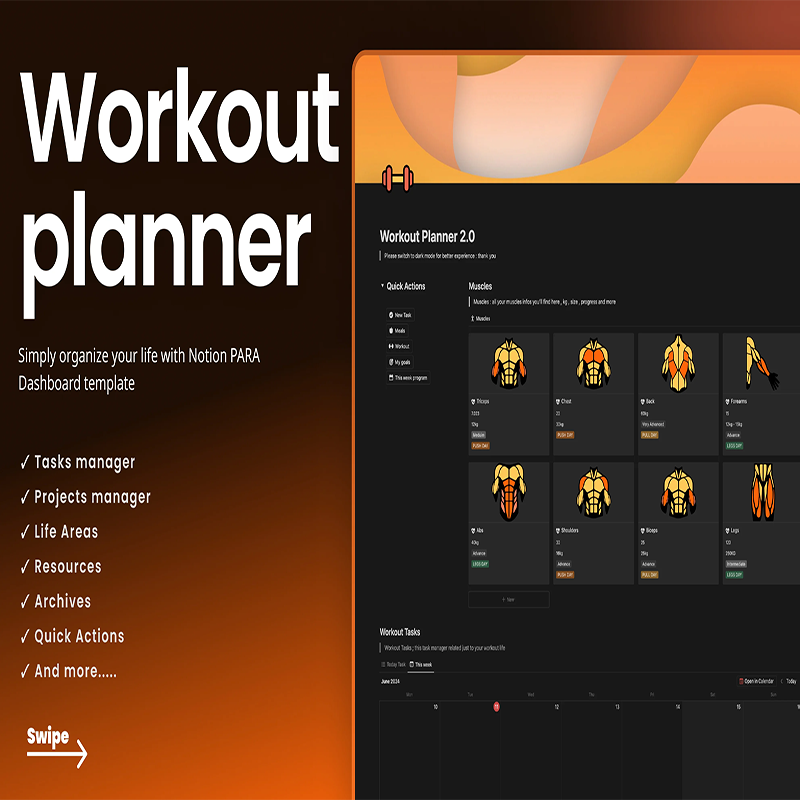
Workout Planner 2.0
Original price was: $14.95.$0.00Current price is: $0.00.
Description
Workout Planner 2.0
Workout Planner 2.0 Review: All-in-one Notion fitness and life organizer for workouts, goals, and tracking.
About the Vendor
olsnotion
What Is It? (Workout Planner 2.0 Review)
Staying consistent with fitness goals is hard—but staying organized while doing it? Even harder. That’s exactly where Workout Planner 2.0 steps in.
In this Workout Planner 2.0 review, we’re looking at a smart, all-in-one Notion-based fitness and life management template designed to simplify how you plan workouts, track progress, and manage your daily routines.
At its core, Workout Planner 2.0 isn’t just a workout tracker—it’s a complete productivity dashboard built using the PARA method (Projects, Areas, Resources, Archives). This means you’re not only organizing your fitness journey but also aligning it with your broader life goals.
The template includes structured sections for exercise planning, workout programs, muscle tracking, and progress monitoring, alongside life organization tools like task managers and project dashboards. Everything lives inside Notion, giving you flexibility and customization without needing multiple apps.
What makes it particularly appealing is how it blends fitness planning with life organization. You can map out your workouts, plan your meals, track your goals, and even visualize your progress—all from a single dashboard.
Whether you’re someone just starting your fitness journey or already deep into structured training, this template gives you a clean and minimal system to stay on track. And since it’s priced at just $14.95, it’s positioned as a low-cost yet high-value solution for those who want clarity and consistency.
Features and Benefits
One of the standout aspects of Workout Planner 2.0 is how much functionality is packed into a simple Notion template.
First, you get a complete workout management system. This includes sections for exercises, workout routines, and full programs. You can categorize workouts by muscle groups, making it easier to follow structured training splits and avoid imbalance.
The muscle tracking feature helps you stay intentional with your training. Instead of randomly choosing exercises, you can ensure every muscle group is being worked consistently.
Another powerful feature is the progress tracking system. While you’ll need to create your own progress charts, the framework is already there. This gives you flexibility to track what matters most—whether it’s weight lifted, reps, or body measurements.
You also get a workout goals tracker, which helps turn vague ambitions into measurable targets. This is crucial for long-term consistency and motivation.
On top of fitness features, the template includes a PARA dashboard system, which brings in task management, project tracking, life areas, resources, and archives. This means you’re not just planning workouts—you’re organizing your entire lifestyle around your goals.
The meal planner is another valuable addition, allowing you to align your nutrition with your fitness plan without needing a separate tool.
Finally, the quick actions and navigation bar make the system easy to use. You can jump between sections without friction, which is important for maintaining daily habits.
Overall, the benefit here is clear: less clutter, more focus, and better consistency.
How Does It Work?
Using Workout Planner 2.0 is straightforward, especially if you’re already familiar with Notion.
Once you get access, you simply duplicate the template into your own Notion workspace. From there, everything is pre-structured and ready to go.
You’ll start by setting up your workout programs. This involves defining your routines—whether it’s push/pull/legs, full body, or custom splits. Each workout can then be linked to specific exercises and muscle groups.
Next, you can input your exercise database, organizing movements based on muscles. This makes it easy to build workouts quickly without overthinking.
The task and project manager sections allow you to integrate your fitness routine into your daily life. For example, you can schedule workouts as tasks or tie them to specific goals.
The meal planner helps you outline your weekly or daily nutrition, ensuring your diet supports your training.
For tracking progress, you’ll log your workouts and update your progress charts manually. While this requires some effort, it also gives you full control over how you measure success.
The PARA system works in the background to keep everything organized:
- Projects: Your fitness goals or programs
- Areas: Ongoing responsibilities like health
- Resources: Workout knowledge, exercises
- Archives: Completed programs or old plans
Over time, this creates a clear, structured system that evolves with your fitness journey.
Who Is It For?
This Workout Planner 2.0 review wouldn’t be complete without identifying who will benefit most from it.
This template is ideal for:
- Fitness beginners who need structure and guidance
- Intermediate gym-goers who want better organization
- Notion users looking to combine productivity with fitness
- Busy individuals who want everything in one place
- Goal-oriented people who enjoy tracking progress
It’s especially useful for those who feel overwhelmed juggling multiple apps for workouts, tasks, and planning.
However, if you prefer fully automated fitness apps with built-in analytics and no manual input, this might feel a bit hands-on. This system rewards those who enjoy customization and control.
Why Choose It?
There are plenty of workout planners out there, so why choose Workout Planner 2.0?
The biggest advantage is integration. Instead of using separate tools for workouts, tasks, and life planning, everything is unified inside Notion.
Another key reason is flexibility. Unlike rigid fitness apps, this template lets you customize everything—from workouts to progress tracking.
It also follows the PARA method, which is a proven productivity framework. This elevates it beyond a simple fitness planner into a complete life organization system.
The price point is another strong factor. At just $14.95, it’s an affordable investment compared to monthly subscriptions for multiple apps.
Finally, it promotes intentional living. You’re not just tracking workouts—you’re aligning your health, goals, and daily actions in one place.
Funnel Details
$14.95
FAQs
1. Is Workout Planner 2.0 a software or app?
It’s a Notion template, so you’ll need a free or paid Notion account to use it.
2. Do I need Notion experience?
Basic familiarity helps, but the layout is beginner-friendly.
3. Can I customize the template?
Yes, fully. That’s one of its biggest strengths.
4. Does it track progress automatically?
No, you’ll need to manually input data and create charts.
5. Is it suitable for beginners?
Yes, especially those who want a structured system.
6. Can I use it for meal planning?
Yes, it includes a dedicated meal planner.
7. Is this a one-time purchase?
Yes, you pay once and use it indefinitely.
8. Can I access it on mobile?
Yes, through the Notion app on your phone or tablet.
Conclusion and Call to Action
To wrap up this Workout Planner 2.0 review, this is a smart and practical solution for anyone who wants to bring order to their fitness and daily life.
It’s not just a workout tracker—it’s a complete system for planning, tracking, and improving your lifestyle. While it does require some manual input, the payoff is a highly personalized and organized approach to fitness.
If you’re tired of scattered tools and want everything in one place, Workout Planner 2.0 is definitely worth trying—especially at its affordable price point.
See More Of Our Themes, Templates and Plugins Here
Related products
-
Sale!

Freedom In Forgiveness
Price range: $3.99 through $5.99 -
Sale!

Affiliate PDF Brander Software
Original price was: $27.99.$3.99Current price is: $3.99. -
Sale!

Scuba Diving Video Site Builder Software
Original price was: $27.99.$3.99Current price is: $3.99. -
Sale!

1 day meditation
Original price was: $79.00.$6.99Current price is: $6.99.
Reviews
There are no reviews yet.