
Description
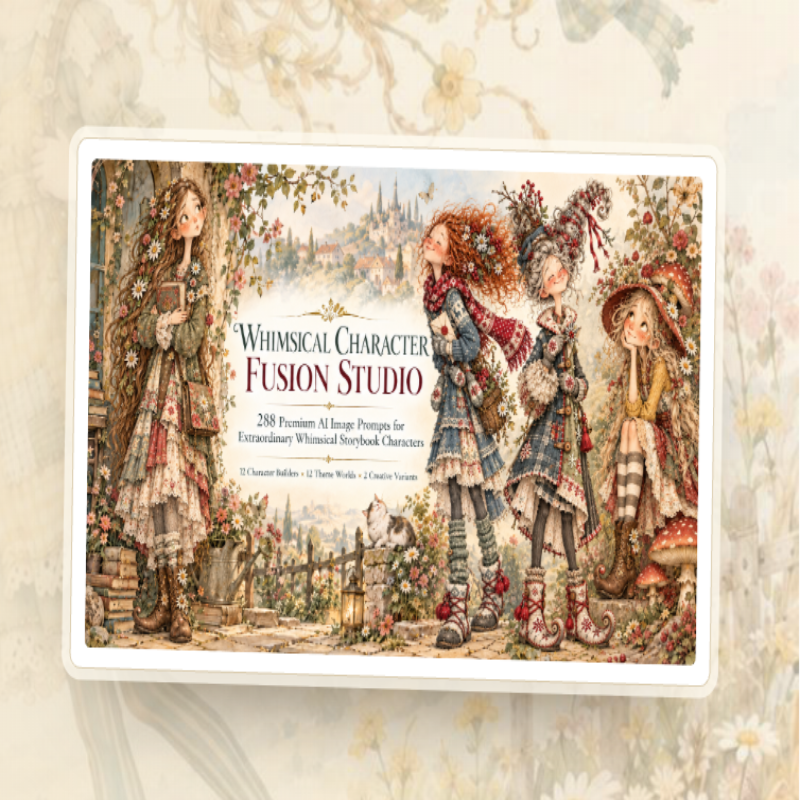
Whimsical Character Fusion Studio
Create distinctive storybook girl clipart with 288 AI prompts, practical tools, and flexible resell rights.
About the Vendor
Ann Le is an independent digital product creator who develops AI-assisted resources for people working with clipart, printables, and journal kits.
According to the supplied sales page, she created Whimsical Character Fusion Studio after noticing that short AI prompts often produce repetitive, doll-like characters. Her approach was to write each of the 288 prompts in detail, covering facial features, hairstyles, clothing, poses, colours, and character stories.
The sales page also states that sample prompts were tested in ChatGPT before the product was released.
For product support, the vendor lists support@annle89.com. The purchase includes a 30-day money-back guarantee, with refund requests directed to that email address within the stated period.
This background helps explain the product’s focus: it is a practical resource for digital creators who want a more structured starting point for AI-generated artwork, rather than a general-purpose AI art course.
What Is Whimsical Character Fusion Studio?
Imagine opening your digital art shop and finding that your next collection of characters already has a theme, a personality, a colour palette, and a story. Instead of spending hours trying to persuade an AI image generator to produce something different from the usual big-eyed cartoon girl, you have a detailed prompt ready to guide the creative process.
That’s the idea behind Whimsical Character Fusion Studio.
Whimsical Character Fusion Studio is an AI image prompt library created for people who make clipart, printable artwork, stickers, junk journals, and related digital products. Its central offering is a collection of 288 complete prompts for generating whimsical girl characters in a hand-painted storybook aesthetic inspired by watercolour, coloured pencil, and ink.
The library is organised around three elements: personality, world, and art style. There are 12 personalities, 12 themed worlds, and two separately written style variations for each combination. Multiply those together, and you get 288 prompts.
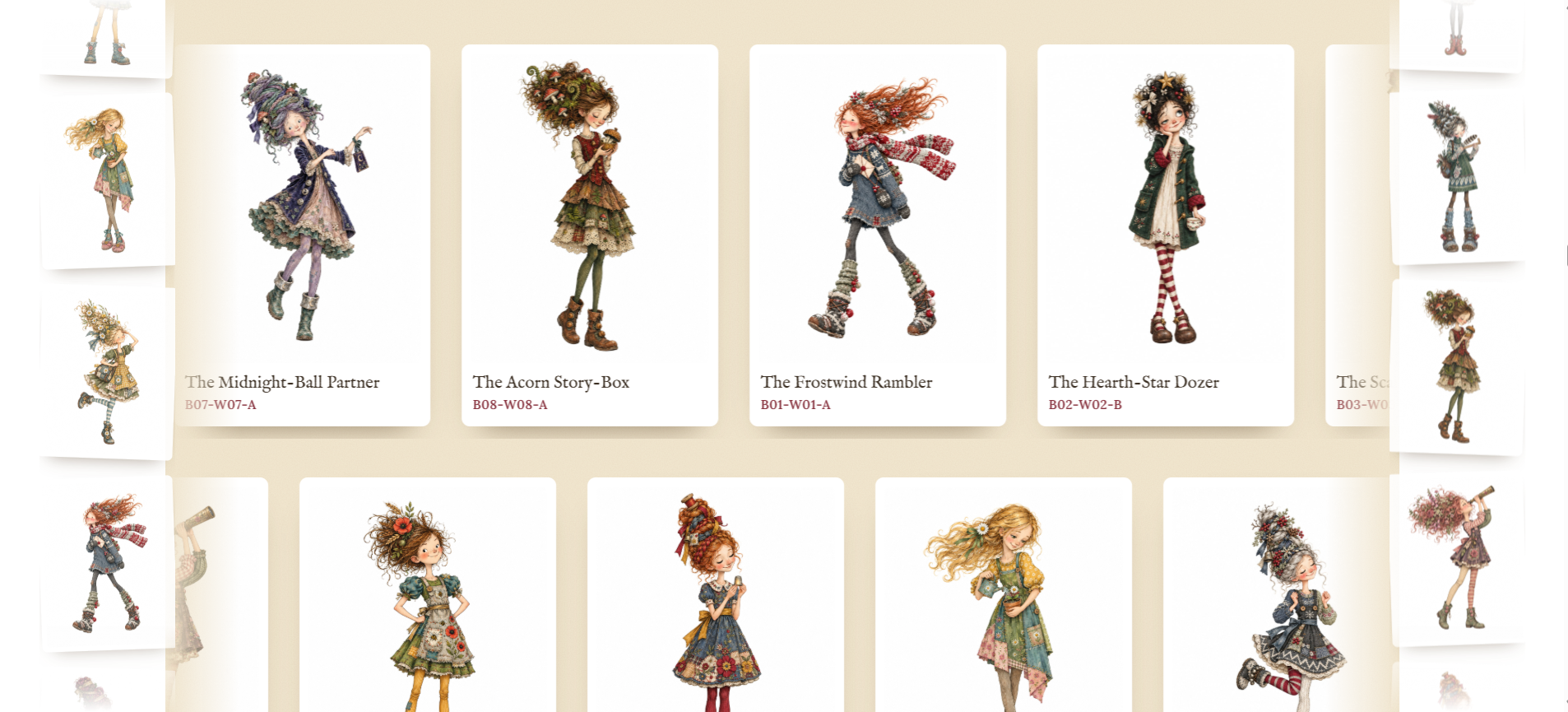
The personalities range from the Wild Wanderer and Dreamy Daydreamer to the Mischievous Pixie, Curious Collector, Botanical Tinkerer, and Gentle Enchanter. Each one has a distinct character concept, helping you move beyond generic illustrations that look almost identical.
The themed worlds provide another layer of variety. Nordic Frost, Christmas Cottage, Victorian Christmas, Gingerbread Bakery, Mushroom Forest, English Rose Garden, and Patchwork Cottage are among the available settings. Each world has its own colour palette, making it easier to generate characters that feel like part of a coordinated collection.
The two variations, A and B, are also worth understanding. They are not simply the same character with a different background. They are separately written prompts designed to produce different character interpretations. Variant A, called Extraordinary Wild, leans towards bold silhouettes and dramatic hair, while Variant B, Soft Storybook Charm, favours a softer, airier appearance.
Another important distinction is that this is a prompt library, not a finished clipart bundle. You receive instructions for generating artwork using an AI image tool such as ChatGPT. You do not receive 288 ready-made character images.
The main library is available in HTML, PDF, DOCX, and TXT formats. The HTML edition includes search and filtering features, while the accompanying guides explain how to generate, inspect, prepare, and export your artwork.
For digital product creators, this makes Whimsical Character Fusion Studio a structured starting point for developing a themed illustration collection. It does not eliminate the creative work, but it can reduce the time spent planning characters and writing prompts from scratch.
Whimsical Character Fusion Studio Features and Benefits
The main attraction of Whimsical Character Fusion Studio is the combination of a large prompt collection, an organised creative system, commercial-use guidance, and practical supporting resources.
Here is a closer look at what you get and how each feature may help.
1. A library of 288 detailed AI prompts
The core product includes 288 standalone prompts, each designed around a specific character, personality, themed world, and art variation.
Rather than relying on a short description, the prompts address details such as facial structure, hair shape, pose, clothing, colours, composition, and rendering style. The intended benefit is greater control over the direction of your generated artwork.
The results will still depend on the AI tool and may require several attempts, but a detailed starting point can be more useful than repeatedly experimenting with vague instructions.
2. Twelve distinctive personalities
The personality system helps you create characters with different moods, actions, and visual identities.
For example, a Curious Collector might hold specimen jars and magnifiers, while a Little Story Keeper might carry books, letters, or a story box. This variety can help you develop more interesting themed bundles instead of filling a collection with interchangeable figures.
3. Twelve coordinated worlds
The worlds provide a framework for creating seasonal and aesthetic collections.
Nordic Frost and Snowy Woodland suit winter-themed artwork, while Wild Daisy, Meadow Wildflower, and English Rose Garden offer floral directions. Christmas Cottage and Gingerbread Bakery provide further seasonal possibilities.
Shared palettes can help your characters look more cohesive when displayed together, although you will still need to review and adjust individual results.
4. Two separately written art variations
Each personality-world combination includes two variations: Extraordinary Wild and Soft Storybook Charm.
This gives you additional creative directions without requiring you to invent an entirely new concept. It can also help you test whether a bolder or gentler style works better for a particular product.
5. Searchable library and multiple file formats
The prompt library is supplied in HTML, PDF, DOCX, and TXT formats. The HTML version supports searches by prompt ID, character, theme, or prop, with filters for personality, world, and variation.
A built-in index makes it easier to locate a specific prompt, while one-click copying simplifies the process of transferring it into your image generator.
6. Three practical guides
The Quick Start Guide helps you begin, the Composition and Export Guide explains artwork preparation, and the Image Quality Checklist covers common issues such as faces, hands, backgrounds, margins, upscaling, and export settings.
These resources are particularly useful for beginners who may not realise that an attractive AI image is not necessarily ready to sell as a printable.
7. Five creator bonuses
Sheet Studio
A browser-based support tool for arranging generated artwork on US Letter or A4 sheets, separating pieces through colour-based background cutting, and exporting sheets or individual transparent PNG files. The vendor describes 300 DPI export support.
Whimsical Listing Lab
Helps create listing graphics in seven layouts, with Etsy square, Etsy 4:3, and Pinterest dimensions. It includes storybook colour schemes, patterns, and fonts.
Character Rescue and Consistency Toolkit
Includes 36 repair and consistency prompts, six rescue workflows, a Character Identity Lock worksheet, and a printable quality-control checklist.
Etsy SEO and Listing Copy Kit
Provides 48 prompts for keyword ideas, titles, tags, descriptions, and pre-publish checks, plus workflows, a tracker, a checklist, and worked examples.
Character-to-Product Blueprint Vault
Offers 24 product blueprints for formats such as clipart packs, sticker sheets, bookmarks, cards, and wall art, with sizing information, worksheets, workflows, and a time-and-pricing calculator.
Bonuses 1 and 2 are optional support tools for your own use. Bonuses 3, 4, and 5 carry Full PLR, resell rights, and master resell rights under the stated terms.
8. Commercial-use and reselling rights
The licence permits commercial use of generated images, subject to the applicable AI platform terms and law. The written prompt materials may be modified, rebranded, translated, and resold after meaningful edits.
Changing only a cover, logo, title, or price is not sufficient. The licence also does not guarantee exclusive copyright in AI-generated images.
Taken together, these features make Whimsical Character Fusion Studio more than a list of prompts. It is a small creative workflow package, although its value depends on how much artwork you intend to generate and how much preparation you are willing to do.
How Does Whimsical Character Fusion Studio Work?
One appealing aspect of Whimsical Character Fusion Studio is that the basic workflow is relatively straightforward. You do not need to write all 288 prompts yourself, and the searchable library helps you find a character concept without manually browsing every entry.
However, generating an image is only the beginning. If your goal is to sell clipart or printable products, you will also need to check the artwork and prepare it for its intended use.
Here’s how the process works.
Step 1: Download and explore the library
After purchasing Whimsical Character Fusion Studio, download the files and open the HTML prompt library in a compatible browser.
You can also use the PDF, DOCX, or TXT versions if you prefer reading prompts in a document. Start by exploring the personality, world, and variation categories to understand the range of characters available.
If you’re new to AI artwork, choose one simple concept rather than trying to generate an entire collection immediately.
Step 2: Choose a character, world, and variation
Select a prompt that matches the kind of product you want to create.
For example, you might choose a Botanical Tinkerer from the Meadow Wildflower world for a spring-themed clipart collection. Alternatively, a Wild Wanderer from Nordic Frost could be a good starting point for winter printables.
The library assigns each prompt an ID, such as B01-W01-A, so you can keep track of the character and reproduce your workflow more easily.
Step 3: Copy the complete prompt
Each prompt is designed to stand alone. The sales page describes them as detailed instructions exceeding 4,000 characters.
Click the copy option in the library, then paste the prompt into a compatible AI image generator.
Because the prompt already describes the character’s face, hair, clothing, pose, palette, and composition, you have a more developed starting point than a simple instruction such as “draw a whimsical girl.”
Step 4: Generate the image
Use the chosen AI tool to generate your character. ChatGPT is the example shown on the sales page, but you should confirm that any alternative tool you use supports your desired workflow and permits your intended commercial use.
Do not expect every generation to match the example perfectly. AI-generated faces, hands, accessories, and other details can still contain errors. You may need to regenerate the image or adjust the prompt to obtain a result you like.
Step 5: Inspect and repair the artwork
Examine the character carefully before using the image in a product.
Check the face, hands, hair, shoes, clothing details, and overall silhouette. Look for unwanted objects, distorted accessories, incomplete limbs, and background elements that could interfere with cutting out the character.
The Character Rescue and Consistency Toolkit can provide additional repair prompts and workflows, but it does not guarantee perfect results.
Step 6: Upscale and remove the background
AI-generated images may not have enough resolution for the print size you want. The vendor recommends upscaling the artwork to a resolution suitable for printing at 300 PPI.
For example, an 8.5 × 11-inch image at 300 pixels per inch requires 2,550 × 3,300 pixels. Simply changing the resolution metadata does not add genuine detail, so use an appropriate upscaling process and inspect the result.
Next, remove the background if you need a transparent PNG. Sheet Studio can assist with certain preparation tasks, but you can also use another suitable image editor or background-removal tool.
Step 7: Build your product
Arrange the finished characters into sticker sheets, clipart packs, journal kits, bookmarks, greeting cards, or other designs.
You can use Whimsical Listing Lab to prepare promotional listing graphics and the Etsy SEO and Listing Copy Kit to help draft product descriptions and tags.
Finally, export the files in the correct dimensions and formats, check the margins and print quality, and review the relevant marketplace rules before publishing.
The key point is that Whimsical Character Fusion Studio supplies the prompts and supporting resources, not a completely finished, ready-to-sell product. You remain responsible for the quality, design, and compliance of everything you publish.
Who Is Whimsical Character Fusion Studio For?
Whimsical Character Fusion Studio is best suited to people who enjoy creating digital products and want a structured way to generate illustrated characters. It may be particularly useful if you already have a design workflow but struggle with developing distinctive characters or keeping a collection visually consistent.
Here are the audiences most likely to benefit.
1. Clipart creators
If you sell PNG illustrations or themed clipart bundles, the 288 prompts offer a starting point for building collections around different personalities and worlds.
You could create a winter collection, a woodland series, or a set of botanical characters. The shared palettes and detailed visual descriptions may help you develop a more recognisable style across a bundle.
However, you will still need to generate, inspect, edit, and package the images yourself.
2. Printable and sticker designers
The full-body character format is intended to work well with sticker sheets, bookmarks, greeting cards, gift tags, and similar products.
Creators who enjoy combining illustrations with text, borders, patterns, or decorative elements may find the prompts useful as a source of artwork for their designs.
3. Junk journal and scrapbook creators
The vintage storybook aesthetic, hand-painted textures, botanical themes, and seasonal settings may appeal to people making junk journal kits, scrapbook embellishments, and printable ephemera.
The different worlds provide a starting point for creating coordinated collections, although you may need to add papers, frames, labels, and other design elements to complete a journal kit.
4. Beginners exploring AI-assisted art
Newcomers who are comfortable learning a few tools but find prompt writing difficult may appreciate the ready-made instructions and quick-start documentation.
That said, this is not a substitute for learning image editing, file preparation, and quality control. Beginners should be prepared to experiment rather than expect every generated image to be perfect on the first attempt.
5. Digital product sellers interested in PLR
The Full PLR, resell rights, and master resell rights may appeal to creators who want to develop their own prompt-based products.
The written materials can be meaningfully modified, translated, reorganised, and repackaged under the licence conditions. Three of the five bonuses also carry the stated resale rights.
The requirement for meaningful modifications is important. You cannot simply change the cover and sell the original prompt library as your own product without substantive edits.
Who might not benefit as much?
Whimsical Character Fusion Studio may be less suitable for people who want finished illustrations delivered immediately, prefer photorealistic artwork, or do not want to use an AI image generator.
It may also be unnecessary for experienced prompt engineers who already maintain a large collection of their own detailed character prompts.
Ultimately, the product is most relevant to creators who value a ready-made creative framework and are willing to do the work needed to turn generated images into polished products.
Why Choose Whimsical Character Fusion Studio?
There are plenty of ways to create AI artwork. You can write your own prompts, experiment with different generators, or purchase finished clipart bundles. So what makes Whimsical Character Fusion Studio worth considering?
Its strongest selling point is the combination of character variety and structure.
First, it addresses a specific creative problem. Generic prompts often produce similar-looking characters. Whimsical Character Fusion Studio attempts to address this through detailed character descriptions, distinctive hairstyles, varied poses, unusual facial details, and individual character stories.
Whether the generated images consistently achieve that goal will depend on your AI tool and the quality of each result, but the structured approach is a meaningful advantage over starting from a blank prompt every time.
Second, the collection is organised around complete themes. The 12 personalities and 12 worlds provide a clear system for planning product lines. Instead of generating unrelated illustrations, you can focus on one world and create a coordinated collection with a shared palette and visual direction.
Third, the prompts are supported by practical resources. The searchable library, guides, quality checklist, repair toolkit, and product blueprints cover several stages of the process. The optional Sheet Studio and Whimsical Listing Lab tools offer additional assistance with artwork preparation and listing graphics.
These extras do not eliminate the need for design work, but they give buyers more than the core prompts alone.
Fourth, the commercial rights offer flexibility. Buyers can use the prompts to generate images for commercial projects, subject to the relevant laws and AI platform terms. They can also meaningfully modify and resell the written prompt materials under the stated licence. This flexibility may be attractive to creators who want to build their own digital product businesses.
Finally, the entry price is relatively accessible. At $17 as a one-time payment, the product offers a substantial prompt collection and supporting resources without a recurring subscription stated on the sales page. A 30-day money-back guarantee also gives eligible buyers a defined period to evaluate the download.
Still, a low price does not automatically make a product worthwhile. The real value depends on whether the style fits your audience, whether your chosen AI tool produces usable results, and how much time you save compared with writing prompts yourself.
My assessment is that Whimsical Character Fusion Studio is worth considering if you regularly create storybook-style clipart or printables. Its structured prompt system and supporting materials are the main attractions. If you expect instant, finished artwork or guaranteed commercial success, it is unlikely to meet those expectations.
Frequently Asked Questions About Whimsical Character Fusion Studio
1. What exactly do I get when I buy Whimsical Character Fusion Studio?
You receive 288 standalone AI image prompts organised into 12 personalities, 12 themed worlds, and two art variations. The main prompt library comes in HTML, PDF, DOCX, and TXT formats.
You also receive a Quick Start Guide, Composition and Export Guide, Image Quality Checklist, and a licence document. Five bonuses are included: Sheet Studio, Whimsical Listing Lab, Character Rescue and Consistency Toolkit, Etsy SEO and Listing Copy Kit, and Character-to-Product Blueprint Vault.
The important distinction is that finished character images are not included. You must generate the artwork using an AI image tool and prepare it for your intended use.
2. Which AI image generator do I need?
The sales page demonstrates the prompts with ChatGPT. The prompts are written as detailed instructions for generating character illustrations, but the supplied information does not establish that every prompt will perform equally well across every AI image generator.
If you intend to use another platform, check that it supports your preferred image-generation workflow and that its terms allow your intended commercial use. You may need to adjust prompts to suit the tool.
3. Do I need a paid AI subscription?
The sales page does not establish that a paid AI subscription is required. Whether you need one depends on the image generator you choose, its current features, and its usage limits.
Before buying, consider whether your existing AI tool can generate the kind of images you want. You should also check any generation limits or additional costs that could affect the time and expense involved in creating a complete collection.
4. Can I sell the images I create with these prompts?
The vendor states that you may use generated images commercially, subject to the AI platform’s terms and applicable law. You could potentially use the images in clipart bundles, sticker sheets, junk journal kits, bookmarks, greeting cards, and other digital products.
However, commercial use does not mean that every generated image is automatically suitable for resale. You must inspect the artwork, check the relevant platform rules, and make sure your finished products meet the requirements of the marketplace where you intend to sell them.
The licence also does not guarantee exclusive copyright in AI-generated artwork.
5. Can I resell Whimsical Character Fusion Studio as my own product?
The licence permits buyers to modify, rewrite, rebrand, translate, and repackage the written prompt materials, then resell the meaningfully modified material under the stated conditions.
Simply changing the title, cover, logo, or price does not count as meaningful modification. If you pass rights to your buyers, they must follow the same requirement.
Bonuses 3, 4, and 5 also carry Full PLR, resell rights, and master resell rights according to the sales page. The two online support tools, Sheet Studio and Whimsical Listing Lab, are for your own use and are not included in the PLR rights grant. Read the complete licence before redistributing any materials.
6. Are the generated images ready to print or upload to Etsy?
Not necessarily. AI-generated images may need corrections, upscaling, background removal, resizing, and layout adjustments before they are suitable for a finished product.
The vendor recommends preparing artwork for printing at 300 PPI. For example, a US Letter page at 300 PPI requires 2,550 × 3,300 pixels.
You should also inspect faces, hands, hair, accessories, edges, and margins. The included guides and support tools can help with parts of this process, but they do not guarantee that every output will meet print or marketplace requirements.
7. Will Whimsical Character Fusion Studio help me make money?
It may help you develop artwork and product ideas more efficiently, but it cannot guarantee sales or profit.
Your results will depend on factors such as artwork quality, product differentiation, pricing, listing presentation, customer demand, marketing, competition, and your ability to prepare and publish products. The sales page presents examples of an active clipart market, but market listings alone do not establish your likely sales.
Treat the Studio as a creative resource, not a guaranteed income opportunity. Start with a small collection, evaluate the finished products, and test audience interest before investing heavily in a larger product line.
Whimsical Character Fusion Studio Review — Final Verdict
After examining the features, workflow, bonuses, and licensing terms, Whimsical Character Fusion Studio looks like a useful resource for digital product creators who want to develop distinctive storybook-style character artwork without writing every AI prompt from scratch.
Its biggest advantage is the structured collection of 288 detailed prompts. With 12 personalities, 12 themed worlds, and two separately written variations, you have a broad range of character concepts to explore. The searchable library makes those prompts easier to navigate, while the accompanying guides and creator bonuses provide additional help with preparing artwork and building printable products.
I also like that the product explains what it does and does not include. You are buying prompts, not 288 finished illustrations. That distinction matters because generating, correcting, upscaling, and preparing the images will take time.
The commercial rights are another attraction, particularly for creators interested in developing their own prompt-based products. However, the meaningful-modification requirement must be respected when reselling the written materials. The two optional online tools are also excluded from the PLR rights grant.
What I like
-
288 detailed, standalone prompts with a clear organisational system.
-
Distinctive character concepts and coordinated themed worlds.
-
Multiple file formats and a searchable HTML library.
-
Five bonuses covering artwork preparation, listing graphics, repair workflows, SEO, and product planning.
-
Commercial-use guidance and resale flexibility under the stated licence.
-
A $17 one-time purchase price and a 30-day money-back guarantee.
What to consider before buying
-
No finished character images are included.
-
AI-generated artwork can require repeated attempts and manual corrections.
-
Upscaling, background removal, and design work may require additional tools or expenses.
-
Commercial use and marketplace acceptance are subject to applicable terms and requirements.
-
There is no guarantee that the resulting products will generate sales.
Is Whimsical Character Fusion Studio worth $17?
My verdict: Worth considering for creators who regularly make whimsical clipart and printables.
If you enjoy using AI to create illustrations and want a ready-made framework for producing themed collections, Whimsical Character Fusion Studio offers a practical starting point. The prompt library and supporting resources may save planning time and help you explore character concepts you might not have developed on your own.
On the other hand, if you only need a few illustrations or want ready-to-sell files without additional work, this may not be the best fit.
Before purchasing, consider how frequently you will use the prompts, whether the storybook aesthetic matches your audience, and whether you already have access to a suitable image generator.
If those factors line up with your needs, the $17 price could make the Studio a worthwhile addition to your digital creation workflow.
Ready to explore the collection? Visit the official Whimsical Character Fusion Studio sales page to review the complete offer, licence, and refund terms before deciding whether to buy.
Whimsical Character Fusion Studio review: Explore 288 AI prompts, five bonuses, commercial-use options, and whether it’s worth $17.
See More Of Our Themes, Templates and Plugins and More Here

Reviews
There are no reviews yet.