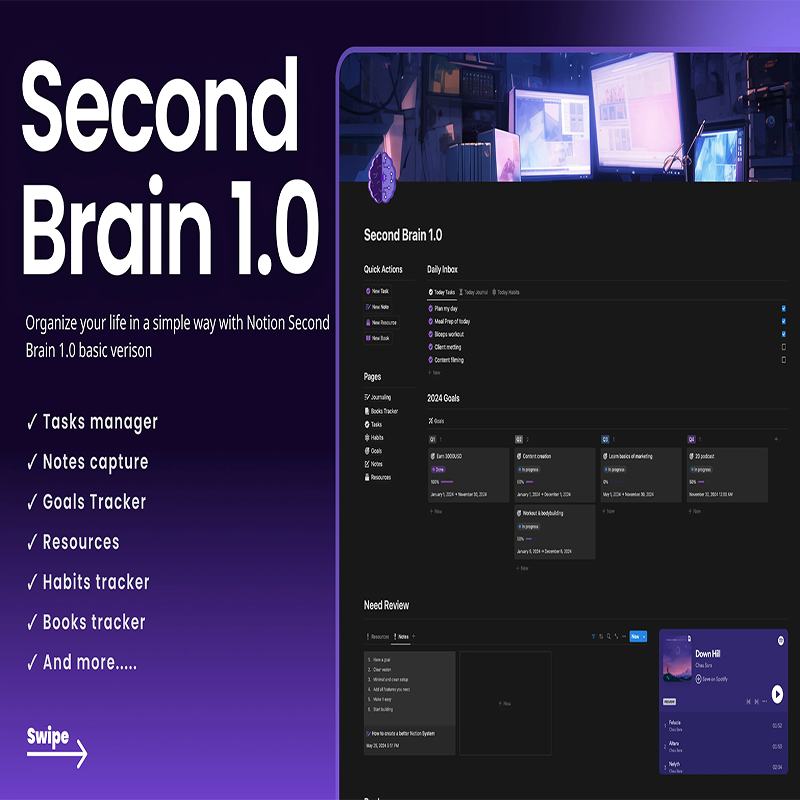
Second Brain
Original price was: $14.95.$0.00Current price is: $0.00.
Description
Second Brain
Second Brain Review: Simple Notion system to organize tasks, notes, goals, and habits in one place.
Part 2: About the Vendor
olsnotion
What Is It? (Second Brain Review)
Imagine having a system that captures your thoughts, organizes your goals, and keeps your entire life structured—all in one place. That’s exactly what Second Brain 1.0 Basic Version aims to deliver.
In this Second Brain review, we’re looking at a Notion-based productivity template designed to help you manage your daily life with clarity and simplicity. Inspired by the popular “second brain” concept, this template acts as an external system where you can store ideas, track tasks, and build better habits without mental overload.
At its core, Second Brain 1.0 is built to replace scattered apps and messy workflows. Instead of jumping between note apps, task managers, and habit trackers, everything is centralized inside Notion. This creates a streamlined experience where your information is always accessible and logically organized.
The template includes essential productivity tools such as a task manager, notes capture system, goals tracker, and habit tracker, along with additional features like a book tracker and resource library. Together, these components form a complete life management system.
What makes this product appealing is its simplicity. Unlike overly complex dashboards, this version focuses on the basics—making it easier for beginners to adopt and maintain.
Whether you’re trying to stay on top of your daily tasks, track personal growth, or simply reduce mental clutter, this template provides a practical framework to get started.
Features and Benefits
The strength of Second Brain 1.0 Basic Version lies in its simplicity combined with essential functionality.
First, the task manager allows you to plan your day, prioritize responsibilities, and stay focused. Instead of juggling multiple to-do lists, you have one central place to manage everything.
The notes capture system is a core feature. It lets you quickly store ideas, thoughts, or important information. This ensures nothing gets lost, which is crucial for productivity and creativity.
Next is the goals tracker, designed to help you define and monitor your objectives. By breaking down goals into manageable steps, it becomes easier to stay consistent and motivated.
The habit tracker is another valuable tool. Building habits is often the foundation of success, and this feature helps you stay accountable by tracking daily actions.
You also get a resource section, where you can store useful materials such as articles, links, or learning content. This turns your Notion workspace into a personal knowledge hub.
The book tracker is a thoughtful addition for those who enjoy reading. You can keep track of books, progress, and insights, making it easier to retain what you learn.
All of these features work together to create a centralized system for managing your life. The main benefit is clarity—you always know where things are and what needs your attention.
How Does It Work?
Using Second Brain 1.0 Basic Version is simple and beginner-friendly.
After purchase, you’ll receive access to the Notion template. With one click, you can duplicate it into your own workspace and start customizing it.
The first step is setting up your task manager. You can add daily tasks, assign priorities, and organize them based on your schedule.
Next, you’ll use the notes capture system to store ideas and information. This becomes your external memory—your “second brain.” Instead of trying to remember everything, you simply record it here.
The goals tracker helps you define what you want to achieve. You can break larger goals into smaller tasks and monitor your progress over time.
The habit tracker is used daily. You log your habits and build consistency by tracking streaks and progress.
For long-term organization, the resources section allows you to save valuable content. This keeps your knowledge organized and easy to revisit.
The book tracker helps you document your reading journey, including notes and takeaways.
Everything is interconnected within Notion, creating a smooth workflow where information flows naturally between sections.
Who Is It For?
This Second Brain review highlights that the template is best suited for people who want simplicity without sacrificing functionality.
It’s ideal for:
- Beginners looking for a simple productivity system
- Students managing notes, tasks, and study materials
- Professionals who want to organize work and personal life
- Content creators capturing ideas and resources
- Anyone interested in personal development
It’s especially useful for those who feel overwhelmed by too many tools and want a minimal, all-in-one solution.
However, advanced users who prefer highly complex systems or automation-heavy setups may find it a bit basic. This version focuses on clarity rather than complexity.
Why Choose It?
So why choose Second Brain 1.0 Basic Version over other productivity tools?
The biggest reason is simplicity. Many Notion templates are overly complicated, but this one keeps things clean and easy to use.
Another advantage is centralization. Everything—tasks, notes, habits, and goals—is in one place, reducing friction and saving time.
It also follows the second brain concept, which is a proven method for managing information and reducing mental load.
The price is another strong point. At just $14.95, it’s an affordable way to build a structured productivity system without ongoing costs.
Finally, it’s highly customizable. Even though it’s simple, you can adapt it to fit your workflow as you grow.
Funnel Details
$14.95
FAQs
1. Is Second Brain 1.0 a software?
No, it’s a Notion template that works inside the Notion app.
2. Do I need a paid Notion account?
No, the free version of Notion is enough.
3. Can I customize the template?
Yes, fully customizable to match your needs.
4. Is it beginner-friendly?
Yes, it’s designed with simplicity in mind.
5. Does it include automation?
No advanced automation, it focuses on manual organization.
6. Can I use it on mobile?
Yes, via the Notion mobile app.
7. What makes it different from other templates?
Its simplicity and focus on essential features.
8. Is it a one-time purchase?
Yes, you pay once and use it forever.
Conclusion and Call to Action
To conclude this Second Brain review, this template is a solid choice for anyone who wants a simple, effective way to organize their life.
It doesn’t try to do too much—instead, it focuses on what matters most: helping you stay organized, productive, and clear-headed.
If you’re looking for a clean, beginner-friendly Notion system that brings everything together in one place, Second Brain 1.0 Basic Version is definitely worth considering.
See More Of Our Themes, Templates and Plugins Here
Related products
-
Sale!

1 day meditation
Original price was: $79.00.$6.99Current price is: $6.99. -
Sale!

Vegan Warrior
Price range: $3.99 through $5.99 -
Sale!

Back Pain Video Site
Original price was: $27.99.$3.99Current price is: $3.99. -
Sale!

Career Planning Video Site Builder
Original price was: $27.99.$3.99Current price is: $3.99.
Reviews
There are no reviews yet.