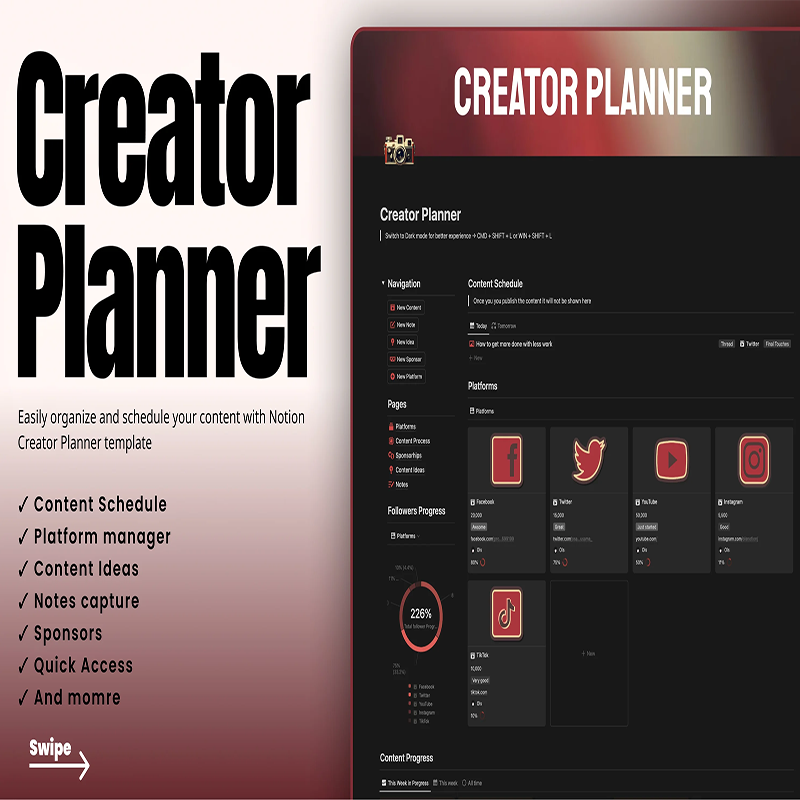
Creator Planner
Original price was: $14.95.$0.00Current price is: $0.00.
Description
Creator Planner
Creator Planner Review: Notion template to plan, schedule, and grow your content with ease.
Part 2: About the Vendor
OlsNotion
What Is It? (Creator Planner Review)
Staying consistent with content creation is one of the biggest challenges for creators today. Ideas come and go, schedules get messy, and managing multiple platforms can quickly become overwhelming. That’s where Creator Planner comes in.
In this Creator Planner review, we’re exploring a Notion-based content planning and management template designed to help creators organize, schedule, and grow their content efficiently.
Creator Planner is built specifically for content creators—whether you’re on YouTube, Instagram, TikTok, or blogging platforms. Instead of juggling spreadsheets, notes apps, and scheduling tools, this template centralizes everything into one streamlined dashboard inside Notion.
The system includes essential tools like a content calendar, platform manager, content ideas database, and sponsorship manager, making it a complete hub for your creative workflow. You can plan your posts, track collaborations, capture ideas on the go, and monitor your growth—all from a single place.
What makes Creator Planner stand out is its focus on simplicity and usability. It doesn’t overwhelm you with unnecessary complexity but still provides all the key features needed to stay consistent and productive.
Whether you’re just starting out or already managing multiple platforms, this template helps you bring structure to your content strategy. At just $14.95, it offers an affordable solution for creators who want better organization without investing in expensive tools.
Features and Benefits
The Creator Planner template comes packed with features that directly address the needs of modern content creators.
One of the core features is the content calendar, which allows you to visually plan and schedule your posts. This helps maintain consistency, which is critical for growth on any platform.
The platform manager is another powerful tool. It lets you organize your content based on different platforms, making it easier to tailor your strategy for each audience.
You also get a content ideas database, where you can store and organize ideas as they come. This ensures you never run out of content and always have something ready to create.
The notes capture system complements this by allowing you to quickly jot down thoughts, scripts, or inspiration.
For creators working with brands, the sponsorship manager is a standout feature. It helps you track collaborations, manage deals, and stay organized with brand partnerships.
The growth progress chart provides a way to track your performance over time. While it may require manual updates, it gives you valuable insights into your progress.
The quick access navigation ensures everything is easy to find, reducing friction in your workflow.
Overall, the biggest benefit is efficiency—you spend less time organizing and more time creating.
How Does It Work?
Using Creator Planner is simple, especially if you’re familiar with Notion.
After purchasing, you’ll receive access to the template. You can duplicate it into your Notion workspace with a single click.
Start by setting up your platform manager. Add the platforms you use, such as YouTube, Instagram, or TikTok, and define your content types.
Next, use the content calendar to schedule your posts. You can plan content days, assign topics, and keep track of publishing dates.
The content ideas section acts as your creative brain. Whenever inspiration strikes, you can store ideas and later turn them into scheduled content.
The notes capture feature is useful for writing scripts, captions, or brainstorming concepts.
If you work with brands, the sponsorship manager helps you track deals, deadlines, and deliverables.
The growth chart allows you to monitor your progress over time by logging metrics manually.
All these elements are interconnected, creating a smooth and organized workflow that supports consistent content production.
Who Is It For?
This Creator Planner review shows that the template is designed for a wide range of creators.
It’s ideal for:
- Content creators on social media platforms
- YouTubers and bloggers managing publishing schedules
- Freelancers and influencers handling brand deals
- Beginners who need structure and organization
- Small teams managing content workflows
It’s especially useful for creators who feel overwhelmed managing multiple tools and want a single, organized system.
However, if you rely heavily on automation or advanced analytics tools, this template may feel a bit manual. It’s best suited for those who prefer simplicity and control.
Why Choose It?
There are many content planning tools out there, but Creator Planner offers a unique balance of simplicity and functionality.
First, it’s an all-in-one solution. Instead of using separate tools for scheduling, idea storage, and sponsorship tracking, everything is centralized.
Second, it’s easy to use. The layout is clean and intuitive, making it accessible even for beginners.
Third, it’s highly customizable. You can adapt the template to match your workflow and content strategy.
Another reason is affordability. At $14.95, it’s a cost-effective alternative to subscription-based tools.
Finally, it helps you stay consistent and organized, which are two of the most important factors in growing a content brand.
Funnel Details
$14.95
FAQs
1. Is Creator Planner a software?
No, it’s a Notion template used within the Notion app.
2. Do I need a paid Notion account?
No, the free version works perfectly.
3. Can I customize the template?
Yes, it’s fully customizable.
4. Does it schedule posts automatically?
No, it helps you plan content, but posting is manual.
5. Can I manage multiple platforms?
Yes, the platform manager is designed for that.
6. Is it beginner-friendly?
Yes, it’s simple and easy to use.
7. Can I track sponsorships?
Yes, it includes a sponsorship manager.
8. Is it a one-time purchase?
Yes, you pay once and use it forever.
Conclusion and Call to Action
To wrap up this Creator Planner review, this template is a practical and affordable solution for creators who want to stay organized and consistent.
It combines all the essential tools needed for content planning into one clean Notion dashboard. While it requires manual input, it offers flexibility and control that many automated tools lack.
If you’re looking for a simple yet powerful way to manage your content workflow, Creator Planner is definitely worth considering.
See More Of Our Themes, Templates and Plugins Here
Related products
-
Sale!
The Lose Your Belly Diet
Price range: $3.99 through $5.99 -
Sale!
Mental Health Planners Bundle MMR
Original price was: $51.00.$6.99Current price is: $6.99. -
Sale!

What To SHip
Original price was: $99.00.$6.99Current price is: $6.99. -
Sale!

Antioxidants Video Site Builder
Original price was: $27.99.$3.99Current price is: $3.99.
Reviews
There are no reviews yet.