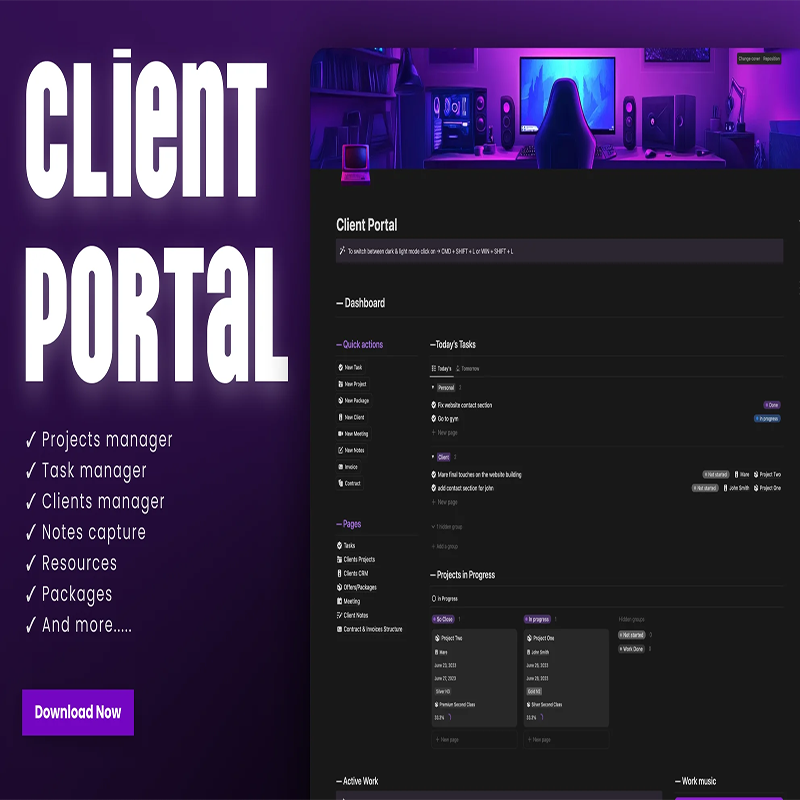
Client Portal
Original price was: $14.95.$0.00Current price is: $0.00.
Description
Client Portal
Client Portal Review: Notion template to manage clients, projects, and collaboration in one place.
About the Vendor
olsnotion
What Is It? (Client Portal Review)
Managing clients efficiently is one of the biggest challenges for freelancers, agencies, and service providers. Between tracking projects, handling communication, and organizing resources, things can quickly become disorganized. That’s where Client Portal comes in.
In this Client Portal review, we’re looking at a Notion-based client management template designed to centralize your workflow and improve collaboration with clients.
Client Portal acts as a complete management system where you can organize client information, track projects, assign tasks, and store important resources—all in one place. Instead of juggling multiple tools like CRMs, spreadsheets, and note apps, this template brings everything together into a clean and structured dashboard.
It includes essential components such as a projects manager, task manager, clients database, notes capture system, and resource hub. Additionally, the inclusion of a packages section allows you to define and present your services clearly.
What makes this product appealing is its focus on simplicity and usability. It’s designed to be easy to navigate while still offering enough functionality to handle real client work.
Whether you’re a freelancer managing a few clients or a small agency handling multiple projects, Client Portal provides a streamlined solution to keep everything organized. At $14.95, it’s positioned as an affordable alternative to expensive client management tools.
Features and Benefits
The Client Portal template offers a range of features that make client management more efficient.
The clients manager is at the core of the system. It allows you to store client details, track relationships, and keep all relevant information in one place. This helps you maintain professionalism and consistency.
The projects manager enables you to organize and monitor all ongoing work. You can track progress, deadlines, and deliverables, ensuring projects stay on schedule.
The task manager helps break down projects into actionable steps. This ensures nothing is overlooked and improves productivity.
The notes capture feature allows you to store meeting notes, ideas, and important information related to clients or projects.
The resources section acts as a centralized hub for files, links, and materials. This makes it easier to access everything you need without searching through multiple platforms.
The packages section is particularly useful for service providers. It allows you to define your offerings clearly, making it easier to present services to clients.
All these features work together to create a centralized and organized workflow. The main benefit is improved efficiency—you spend less time searching for information and more time delivering results.
How Does It Work?
Using Client Portal is simple and intuitive, especially for Notion users.
After purchasing, you’ll receive access to the template. You can duplicate it into your Notion workspace and start customizing it.
Begin by setting up your clients database. Add client details, contact information, and notes to create a complete profile for each client.
Next, use the projects manager to organize your work. Assign projects to specific clients and track their progress.
The task manager allows you to break projects into smaller tasks. You can assign deadlines and priorities to stay on track.
Use the notes capture system to document meetings, ideas, and updates. This ensures all important information is stored in one place.
The resources section can be used to store files, links, and other materials related to your work.
Finally, define your packages and services in the packages section, making it easier to manage and present your offerings.
All components are interconnected, creating a smooth workflow that supports collaboration and organization.
Who Is It For?
This Client Portal review shows that the template is ideal for:
- Freelancers managing multiple clients
- Agencies handling projects and teams
- Service providers offering packages or plans
- Consultants and coaches organizing client work
- Beginners looking for a simple client management system
It’s especially useful for those who want a centralized, easy-to-use solution without investing in complex CRM software.
However, businesses that require advanced automation, integrations, or team collaboration tools may find it somewhat basic. It’s best suited for those who prefer simplicity and flexibility.
Why Choose It?
There are many client management tools available, but Client Portal stands out for several reasons.
First, it’s an all-in-one solution. You can manage clients, projects, tasks, and resources without switching between tools.
Second, it’s easy to use. The clean interface makes it accessible even for beginners.
Third, it’s highly customizable, allowing you to tailor it to your workflow.
Another advantage is affordability. At $14.95, it’s a budget-friendly alternative to expensive CRM platforms.
Finally, it helps you stay organized and professional, which can improve client relationships and overall productivity.
Funnel Details
$14.95
FAQs
1. Is Client Portal a software?
No, it’s a Notion template used within the Notion app.
2. Do I need a paid Notion account?
No, the free version is enough.
3. Can I customize the template?
Yes, fully customizable.
4. Can I manage multiple clients?
Yes, it includes a clients manager.
5. Does it support collaboration with clients?
Yes, you can share Notion pages if needed.
6. Is it suitable for agencies?
Yes, especially small teams or agencies.
7. Does it include automation?
No advanced automation, it’s manual.
8. Is it a one-time purchase?
Yes, you pay once and use it forever.
Conclusion and Call to Action
To wrap up this Client Portal review, this template is a practical and affordable solution for managing client work efficiently.
It brings together all essential tools into one clean dashboard, helping you stay organized and professional. While it may not replace advanced CRM systems, it offers more than enough functionality for freelancers and small businesses.
If you’re looking for a simple, all-in-one client management system, Client Portal is definitely worth considering.
See More Of Our Themes, Templates and Plugins Here
Related products
-
Sale!

Simple Membership Generator
Original price was: $27.99.$3.99Current price is: $3.99. -
Sale!

Vegan Warrior
Price range: $3.99 through $5.99 -
Sale!

LABUBU – AI Viral Niche Prompts for YouTube & TikTok
Original price was: $9.99.$2.99Current price is: $2.99. -
Sale!

Window Blinds Site Builder Software
Original price was: $27.99.$3.99Current price is: $3.99.
Reviews
There are no reviews yet.