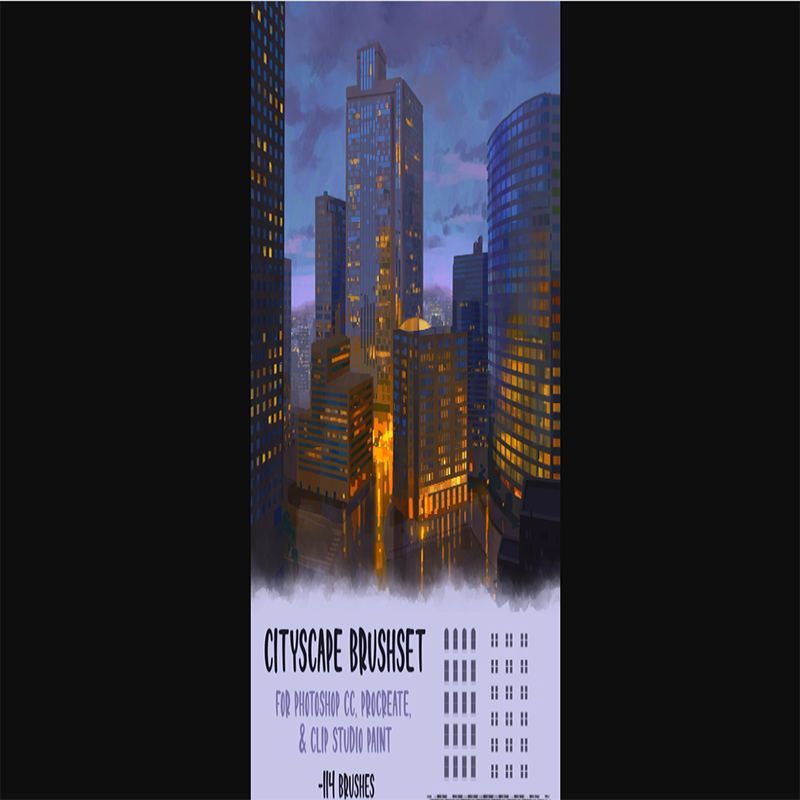
City Brushset (Photoshop CC, Procreate, CSP)
Original price was: $99.99.$0.00Current price is: $0.00.
Description
City Brushset (Photoshop CC, Procreate, CSP)
City Brushset Review: 114 brushes for Photoshop, Procreate & CSP to create stunning cityscapes fast.
About the Vendor
Dave
What Is It? (City Brushset Review)
Creating detailed cityscapes from scratch can be time-consuming, especially when you’re dealing with complex elements like buildings, windows, textures, and lighting. That’s exactly where the City Brushset comes in.
In this City Brushset review, we’re looking at a digital art resource pack that includes 114 responsive brushes designed specifically for creating city environments in Photoshop CC, Procreate, and Clip Studio Paint (CSP).
This isn’t a typical template or software—it’s a toolkit for digital artists. These brushes are built to speed up your workflow, allowing you to quickly sketch and render urban scenes without sacrificing detail or quality.
Each brush is designed to be responsive, meaning it reacts naturally to pressure and strokes, giving you more control and flexibility while drawing. Whether you’re working on concept art, illustrations, or background environments, these brushes help you achieve professional-looking results faster.
Another valuable addition is the included demo video content, which walks you through how to use the brushes effectively. This is especially helpful if you’re new to custom brushes or want to improve your workflow.
Although the creator mentions the set is free with optional tips, it’s listed here at $99.99—so it’s important to verify pricing before purchase. Regardless, the value lies in the time saved and the quality of output.
Overall, the City Brushset is a powerful resource for artists who want to streamline their cityscape creation process.
Features and Benefits
The City Brushset stands out thanks to its practical, artist-focused features.
First, you get 114 brushes, which is a substantial collection. These brushes cover various city elements such as buildings, textures, details, and environmental effects.
The brushes are responsive, meaning they adapt to your drawing style and pressure sensitivity. This results in more natural and dynamic artwork.
Compatibility is another major advantage. The brushset works with:
- Photoshop CC (.abr files)
- Clip Studio Paint (.sut files)
- Procreate (.brushset files)
This makes it accessible to a wide range of artists across different platforms.
You also get PNG files, allowing you to use the assets in other programs that may not support brush imports.
The inclusion of over an hour of demo video content is a big plus. It helps you understand how to use the brushes effectively and improve your workflow.
Another key benefit is the royalty-free license. You can use these brushes in both personal and commercial projects without worrying about restrictions.
Overall, the biggest benefit is speed and efficiency. Instead of manually drawing every detail, you can focus on creativity while the brushes handle repetitive elements.
How Does It Work?
Using the City Brushset is straightforward.
After downloading, you’ll receive different file formats depending on your software:
- .abr for Photoshop
- .sut for Clip Studio Paint
- .brushset for Procreate
You simply import the brushes into your preferred program. The included README file provides step-by-step instructions to guide you through the process.
Once installed, you can start using the brushes immediately in your projects.
For example, you can:
- Block out city structures quickly
- Add building details with a few strokes
- Create textures and depth efficiently
The brushes are designed to respond to pressure, so you can control opacity, thickness, and detail naturally.
If you’re unsure how to use them, the demo videos (linked in the included text file) will walk you through real examples and techniques.
Over time, you’ll develop your own workflow, using these brushes to speed up your art process while maintaining quality.
Who Is It For?
This City Brushset review shows that the product is best suited for:
- Digital artists creating cityscapes or environments
- Concept artists working on games or films
- Illustrators who need detailed backgrounds
- Beginner artists looking to speed up their workflow
- Professionals who want to save time on repetitive details
It’s especially useful for artists who frequently draw urban environments and want to improve efficiency.
However, if you don’t work on cityscapes or prefer fully hand-drawn detail without brushes, this may not be essential for you.
Why Choose It?
There are many brush packs available, but City Brushset offers a few key advantages.
First, it’s highly specialized. It focuses specifically on cityscapes, making it more effective than generic brush packs.
Second, it’s cross-platform, supporting Photoshop, Procreate, and CSP.
Third, it includes educational content, which helps you get more value from the brushes.
Another major benefit is the royalty-free usage, allowing you to use your work commercially without restrictions.
Finally, it helps you achieve professional results faster, which is crucial for both hobbyists and professionals.
Funnel Details
$99.99
FAQs
1. Is City Brushset a software?
No, it’s a set of digital brushes for art programs.
2. Which programs are supported?
Photoshop CC, Procreate, and Clip Studio Paint.
3. Can I use it commercially?
Yes, it’s royalty-free.
4. Are instructions included?
Yes, a README file and demo videos are provided.
5. Do I need drawing experience?
Basic knowledge helps, but beginners can use it too.
6. Can I use it in other programs?
Yes, via included PNG files.
7. Is it beginner-friendly?
Yes, especially with the demo content.
8. Is it a one-time purchase?
Yes, if purchased at the listed price.
Conclusion and Call to Action
To wrap up this City Brushset review, this is a powerful resource for digital artists who want to create detailed cityscapes quickly and efficiently.
With 114 brushes, cross-platform support, and helpful demo content, it offers both value and practicality. Just be sure to confirm the pricing, as it may be available for free or as a tip-based resource.
If you’re looking to speed up your workflow and enhance your environment art, City Brushset is definitely worth checking out.
See More Of Our Themes, Templates and Plugins Here


Reviews
There are no reviews yet.